> For clean Markdown of any page, append .md to the page URL.
> For a complete documentation index, see https://ixopay.ferndocs.com/user-manual/manual/connector/advanced-configuration/subbrand-selection/llms.txt.
> For AI client integration (Claude Code, Cursor, etc.), connect to the MCP server at https://ixopay.ferndocs.com/_mcp/server.
# Subbrand Selection
> **Requires additional setup**
>
> If you want to use this setting, please contact your the Customer Success Manager directly, or contact our Support Team in the [IXOPAY Customer Experience Portal](https://ixopay.my.site.com/support).
## Subbrand Selection Configuration
In case a connector supports subbrand selection using IXOPAY platform's [Hosted Payment Pages](https://documentation.ixopay.com/manual/docs/connector/edit/payment-templates), you can enable the setting in the Connector Details Overview:
* Navigate to the Connector Details Overview - Settings
* Type in **Enable Card Subbrand Selection** and click **+ Add**
* Enter **1** to activate the setting
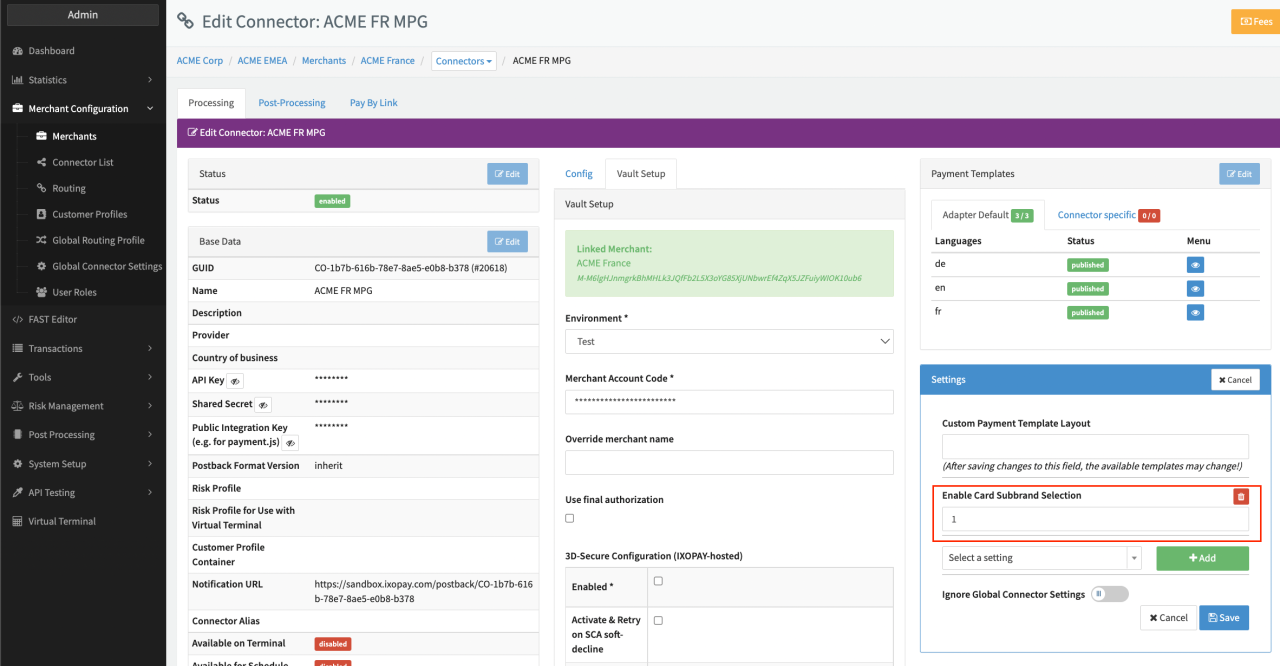Connector Details Overview
## Hosted Payment Page (HPP) Configuration for subbrand selection
To use the subbrand Selection for the IXOPAY platform Hosted Payment Pages (HPP), a Connector that supports subbrand selection needs to be configured as described above. To activate the subbrand selection in the IXOPAY platform HPP the following code snippets need to be added to your payment templates via the FAST Editor.
```php
'cb', 'img' => getStaticLink('/img/cb.png')],
['key' => 'mastercard', 'img' => getStaticLink('/img/mastercard.svg')],
['key' => 'visa', 'img' => getStaticLink('/img/visa.png')],
]
?>
```
* **replace the creditcard number container`div` with this**
```php
```
* **js script part add (before clear input style)**
```js
$(document).on("click", function (e) {
var container = $(".card-holder-container");
if (!container.is(e.target) && container.has(e.target).length === 0) {
$(".card-select-container").hide();
}
});
$(".selected-card-info").on("click", function (evtData) {
$(".card-select-container").toggle();
});
var showBrandSelects = function (keys) {
$(".card-select-container > div").hide();
$.each(keys, function (key, value) {
$("#" + value.toLowerCase() + "-select-container").show();
});
};
var selectSubBrand = function (key) {
$(".selected-card-info").css("display", "flex");
$(".selected-card-info img").hide();
$("#" + key + "-selected-card").show();
$('[name="creditcard_subbrand"][value="' + key + '"]').prop("checked", true);
};
$('[name="creditcard_subbrand"]').on("change", function () {
var key = $('[name="creditcard_subbrand"]:checked').val();
selectSubBrand(key);
$(".card-select-container").hide();
});
Ixopay.PaymentFormV2.numberOn("input", function (evtData) {
console.log(evtData);
if (evtData.sub_brand) {
// we have a sub_brand
// display two options, data.card_type + data.sub_brand
showBrandSelects([evtData.card_type, evtData.sub_brand]);
selectSubBrand(evtData.sub_brand.toLowerCase());
} else {
// no sub_brand, dont show the brandselection
$(".selected-card-info").hide();
}
});
```